

Tired of VLOOKUP limitations? Learn how Python automates Excel file merging, eliminates errors, and saves hours every month—no coding required.
If you’re an analyst who uses VLOOKUP to merge multiple files (or INDEX-MATCH), you’re not alone. Every week, professionals spend hours copy-pasting, adjusting columns, troubleshooting formulas, and rebuilding broken Excel links—all to get their spreadsheets in sync.
There’s a better way: Python automation. And no—you don’t have to know how to code to benefit from it. We’ll do the technical work. You just get clean, fast, accurate results.
This is the ultimate guide for those tired of manual Excel work and looking for an upgrade that feels invisible, powerful, and dependable.
1. The Hidden Costs of Using VLOOKUP to Merge Files
VLOOKUP has been a go-to Excel function for decades.Many users experience similar frustrations when managing large files — learn more about common challenges with monthly Excel reports. It’s familiar, widely used, and reasonably effective—for small tasks. But as your data grows, the cracks begin to show:
- Sluggish performance: With thousands of rows, your workbook grinds to a halt.
- Formula failures: Change the order of columns? Rename a file? Your sheet breaks.
- Manual repetition: Every new report cycle requires hours of cut, paste, and fix.
- Error risk: All it takes is one bad paste or forgotten update to skew your numbers.
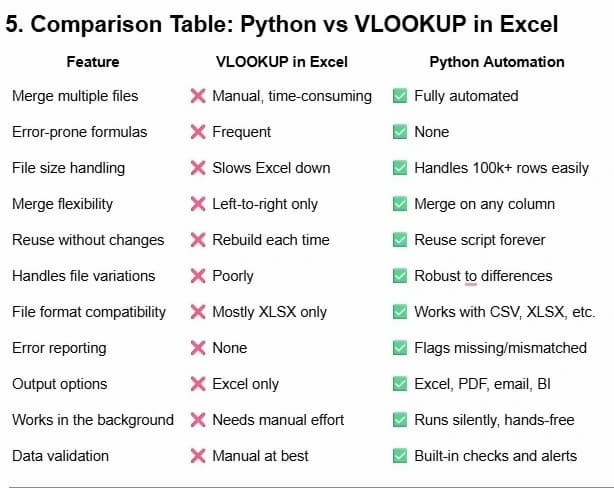
- Lack of flexibility: VLOOKUP can only search left-to-right and requires exact matches unless you do workarounds.
In short, using VLOOKUP to merge multiple files wasn’t the intended use, as it wasn’t built for large or complex datasets.. It’s a stopgap—Python is the solution.
Even more frustrating? VLOOKUP provides no built-in troubleshooting. If something breaks, you’re on your own to track down where the formula failed and why.
2. Why Python Is the Upgrade Excel Users Have Been Waiting For

Python is a modern automation language. Python also helps with text processing and data cleanup in Excel, ensuring consistency across merged reports.. Combined with the pandas library, it can:
- Merge hundreds of spreadsheets in seconds
- Check for errors or missing data before they cause problems
- Automatically format outputs exactly how you want
- Run in the background on a schedule—no clicks required
Python turns your spreadsheet tasks into smart workflows. Explore how to streamline Excel with Python data integration to connect all your business sources seamlessly. It’s not about replacing Excel—it’s about giving Excel superpowers.
And unlike Excel, Python workflows don’t degrade as your data scales. Whether it’s 500 rows or 500,000 rows, automation stays fast and accurate.
3. A Familiar Scenario: Consolidating Regional Sales Reports
Let’s say your team has five regional managers. Every month, they send in their Excel files with sales data. Your job: merge those five files into a clean report.
The Excel Way:
- Open all five files
- Copy and paste data into one workbook
- Use VLOOKUP to align rep names or match lookup values
- Adjust column formats, fix headers, and troubleshoot formulas
- Repeat this same process month after month
The Python Way:
- Place the five files in a shared folder
- Automation picks them up, merges them, cleans them, formats them
- Output Excel report is generated and saved with the current date
- Optional: the file is emailed to your inbox or uploaded to SharePoint
You can even extend this to:
- Validate that every region submitted their report
- Alert you if a column is missing or a revenue entry is blank
- Highlight any numbers that deviate too much from historical data
4. What the Process Looks Like for You (No Code, No Complexity)
Here’s what it’s like to use Python automation—without writing a single line of code:
- You gather your files in a folder like “/Monthly_Reports/”.
- We set up the automation logic behind the scenes. You don’t see code. You see results.
- You receive a perfect Excel file—clean, merged, validated.
- We can add logic like ignoring duplicate rows, highlighting missing revenue, or rounding to two decimals.
- You can run it manually or schedule it to run automatically every Friday morning.
The final output? An Excel file that looks exactly like the one you used to build manually—just without the mess, stress, and errors.
We even integrate versioning if needed, so you keep track of how your data has changed over time.
6. Business Scenarios Python Excels At (Pun Intended)
You’ll benefit from automation if you:
- Consolidate monthly sales reports across teams
- Track inventory from multiple vendors or branches
- Merge survey results across different departments
- Match financial transactions against receipts
- Combine client feedback from several regions
- Reconcile payroll hours with project time logs
- Aggregate budget forecasts from several departments
- Clean up customer data exports from CRM systems
Python’s value grows with complexity. The messier the job, the more automation saves you time.
7. Can’t INDEX-MATCH Do This Too?
Yes, INDEX-MATCH is a more powerful lookup combo in Excel. But it still lives inside the same fragile environment:
- Breaks when files or columns change
- Still requires manual file handling
- Doesn’t scale to many files or large datasets
- Still formula-dependent, and easy to corrupt
INDEX-MATCH is a step forward—but Python is a leap.
And when your job depends on fast, accurate, repeatable data workflows, the leap is worth it.
8. Real-World Impact: Before vs. After
Client: Operations Manager at a manufacturing firm
Before Python:
- Receives weekly production files from 6 factories
- Merges them manually using VLOOKUP and INDEX-MATCH
- Takes 3 hours weekly to clean, combine, format
- Prone to errors and version mismatches
After Python Automation:
- Files are dropped in a shared folder
- Automation runs every Monday at 6 AM
- Report is emailed to the full team by 6:05 AM
- Time saved: ~12 hours/month
- Accuracy increased 100%
The best part? They now use that saved time to forecast issues, negotiate discounts, and improve operations—instead of fixing broken spreadsheets.
9. Your Time is Better Spent Elsewhere
You didn’t get hired to debug Excel formulas. You were hired to solve problems, uncover insights, and lead improvements.
The average analyst or operations lead spends 20–40% of their time managing data manually.
That’s not sustainable.
Python automation is how you:
- Reclaim your hours
- Improve your data integrity
- Get to insights faster
The ROI is clear: automation pays for itself, fast.
10. We Handle the Automation. You Get the Insights.
Don’t worry about learning Python. That’s our job.
We work with professionals across industries to build automation that quietly and reliably powers their reports:
- Clean Excel files generated automatically
- Custom logic for your specific needs
- One-time setup, long-term payoff
- Ongoing support if your needs evolve
You stay in Excel. We handle everything else.
Need charts? Filters? Formatting rules? We’ll build it right in.
